API Keys
All 12 permission scopes, session scoping, creating and deleting keys, header format, and rate limits.
API Keys
API keys are the primary authentication mechanism for your applications talking to the WaSphere Dashboard API. Every request your code makes must include an API key as a Bearer token in the Authorization header.
Authorization: Bearer wsk_abc123...API keys are distinct from the admin JWT used to log in to the dashboard. Keys are meant for programmatic access — server-to-server or automation scripts — not for browser sessions.
Key Format
WaSphere API keys use a prefixed format for easy identification:
wsk_<random characters>The wsk_ prefix makes it easy to identify WaSphere keys in logs, configuration files, and secret scanners. If you're using a secret scanning tool (GitHub secret scanning, truffleHog, etc.), configure it to flag strings matching wsk_[a-zA-Z0-9]{20,}.
Creating an API Key
Via the dashboard:
- Navigate to API Keys in the sidebar
- Click New Key
- Enter a descriptive name (e.g.
whmcs-integrationormobile-app) - Select the permissions this key needs (see table below)
- Optionally restrict to a specific session
- Click Create
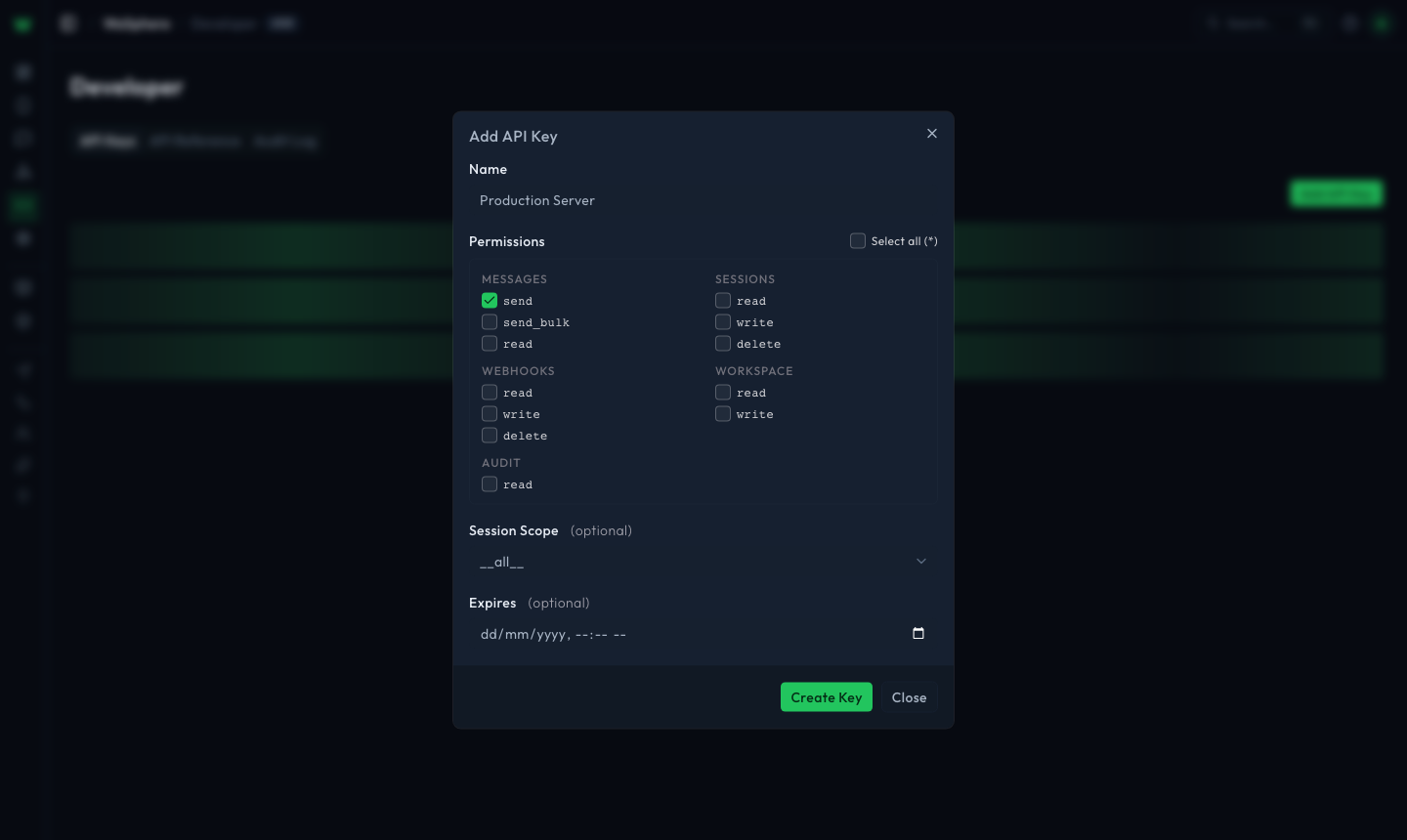
Copy the key immediately — it is only shown once. WaSphere stores a hashed version and cannot reveal the original value.
Created keys appear in the list with their prefix, permissions, scope, and status — the full secret is never shown again:
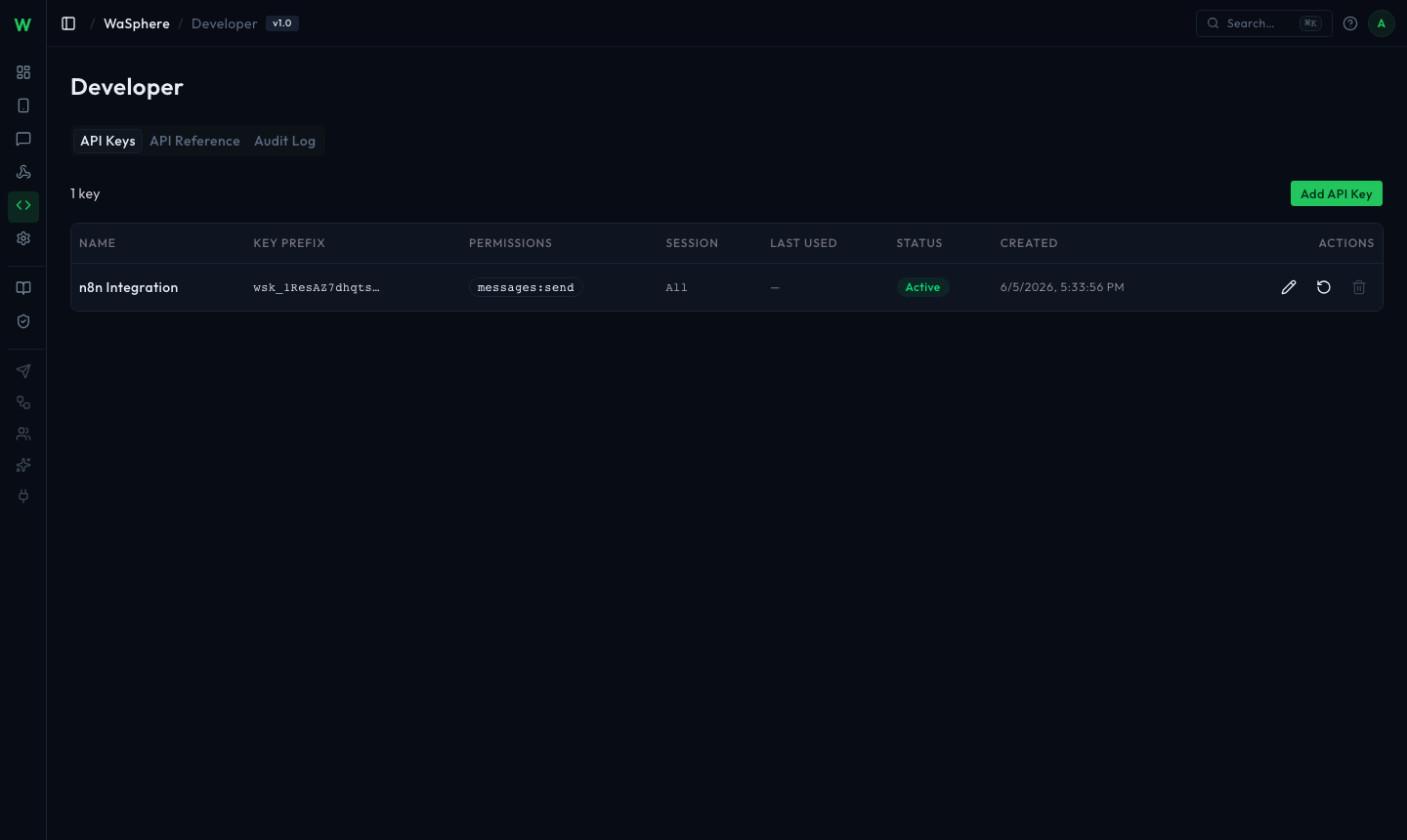
Via the API (requires the admin JWT from your dashboard login). Keys are scoped to a workspace, so the workspace ID is part of the path:
curl -X POST https://api.yourdomain.com/workspaces/be11c51b-1a5a-4bc9-9cb6-7ee7040ec4d8/keys \
  -H "Authorization: Bearer YOUR_ADMIN_JWT" \
  -H "Content-Type: application/json" \
  -d '{
    "name": "whmcs-integration",
    "permissions": ["messages:send", "sessions:read"],
    "sessionId": "my-session"
  }'
Response:
{
  "id": "key_abc123",
  "name": "whmcs-integration",
  "key": "wsk_xK9mN2pQ7rT4vW6yZ1aB3cD5eF8gH0jL",
  "permissions": ["messages:send", "sessions:read"],
  "sessionId": "my-session",
  "createdAt": "2026-05-25T10:00:00.000Z"
}
The key field is only present in the creation response. Store it in your application's secrets manager (AWS Secrets Manager, HashiCorp Vault, environment variable, etc.) immediately. It cannot be retrieved again.
Permissions
WaSphere uses 12 granular permission scopes. Assign only the permissions each key actually needs — following the principle of least privilege.
| Permission | Description |
|---|---|
messages:send | Send any of the 14 supported message types (text, image, video, audio, document, gif, sticker, location, contact, poll, buttons, list, view-once, reaction). |
messages:send_bulk | Send messages to multiple recipients in a single bulk operation. |
messages:read | Read historical message logs for sessions this key can access. |
sessions:read | List sessions and get individual session status, phone number, connection timestamps, and anti-ban settings. |
sessions:write | Create new sessions and update session settings (name, anti-ban config), including initiating reconnects. |
sessions:delete | Delete sessions and remove their stored credentials. |
webhooks:read | List registered webhooks and view delivery history. |
webhooks:write | Create and update webhook endpoints and trigger test deliveries. |
webhooks:delete | Delete webhook endpoints. |
workspace:read | Read workspace settings and metadata. |
workspace:write | Update workspace settings. |
audit:read | Read the workspace audit log. |
For full access, assign the wildcard scope ["*"] instead of listing individual permissions.
Key management endpoints (create / update / delete a key) require the admin JWT, not an API key. This prevents a compromised key from creating new keys or escalating its own privileges.
Typical Permission Sets by Integration Type
| Integration | Recommended Permissions |
|---|---|
| Send-only notifications (e.g. WHMCS, CRM) | messages:send, sessions:read |
| Two-way chat bot | messages:send, messages:read, sessions:read |
| Bulk campaigns | messages:send, messages:send_bulk, sessions:read |
| Webhook-driven automation | messages:send, messages:read, webhooks:read, webhooks:write |
| Admin dashboard / monitoring | ["*"] (full access) |
| Audit / compliance tooling | audit:read, workspace:read |
Session Scoping
By default, an API key can interact with all sessions that its permissions allow. For stronger isolation, restrict a key to a single session.
A session-scoped key:
- Can only read/write data for the specified session
- Returns
403 Forbiddenfor any request involving a different session - Is ideal for multi-tenant setups where each customer has their own WhatsApp number
To scope a key at creation time:
{
  "name": "customer-a-notifications",
  "permissions": ["messages:send", "sessions:read"],
  "sessionId": "customer-a"
}
To update scoping on an existing key (via the dashboard only — changing sessionId via API is not supported to prevent privilege escalation).
Using a Key in Requests
Include the key as a Bearer token in the Authorization header on every request. API calls are scoped to a workspace, so the workspace ID is part of the path:
curl https://api.yourdomain.com/workspaces/be11c51b-1a5a-4bc9-9cb6-7ee7040ec4d8/sessions \
  -H "Authorization: Bearer wsk_xK9mN2pQ7rT4vW6yZ1aB3cD5eF8gH0jL"
const WORKSPACE_ID = 'be11c51b-1a5a-4bc9-9cb6-7ee7040ec4d8';
const BASE_URL = `https://api.yourdomain.com/workspaces/${WORKSPACE_ID}`;
const API_KEY = process.env.WASPHERE_API_KEY;
async function waRequest(path, options = {}) {
const response = await fetch(`${BASE_URL}${path}`, {
...options,
headers: {
'Authorization': `Bearer ${API_KEY}`,
'Content-Type': 'application/json',
...options.headers,
},
});
if (!response.ok) {
const error = await response.json();
throw new Error(`WaSphere API error: ${error.message} (${response.status})`);
}
return response.json();
}
// Usage
const sessions = await waRequest('/sessions');import os
import requests
WORKSPACE_ID = 'be11c51b-1a5a-4bc9-9cb6-7ee7040ec4d8'
WASPHERE_BASE_URL = f'https://api.yourdomain.com/workspaces/{WORKSPACE_ID}'
WASPHERE_API_KEY = os.environ['WASPHERE_API_KEY']
session = requests.Session()
session.headers.update({
'Authorization': f'Bearer {WASPHERE_API_KEY}',
'Content-Type': 'application/json',
})
def wa_request(method, path, **kwargs):
response = session.request(method, f'{WASPHERE_BASE_URL}{path}', **kwargs)
response.raise_for_status()
return response.json()
# Usage
sessions = wa_request('GET', '/sessions')<?php
class WaSphereClient
{
private string $baseUrl;
private string $apiKey;
public function __construct(string $baseUrl, string $apiKey)
{
$this->baseUrl = rtrim($baseUrl, '/');
$this->apiKey = $apiKey;
}
public function request(string $method, string $path, array $body = []): array
{
$ch = curl_init();
curl_setopt_array($ch, [
CURLOPT_URL => $this->baseUrl . $path,
CURLOPT_RETURNTRANSFER => true,
CURLOPT_CUSTOMREQUEST => $method,
CURLOPT_HTTPHEADER => [
'Authorization: Bearer ' . $this->apiKey,
'Content-Type: application/json',
],
]);
if (!empty($body)) {
curl_setopt($ch, CURLOPT_POSTFIELDS, json_encode($body));
}
$response = curl_exec($ch);
$statusCode = curl_getinfo($ch, CURLINFO_HTTP_CODE);
curl_close($ch);
if ($statusCode >= 400) {
$error = json_decode($response, true);
throw new RuntimeException("WaSphere API error: " . ($error['message'] ?? 'Unknown'));
}
return json_decode($response, true);
}
}
$workspaceId = 'be11c51b-1a5a-4bc9-9cb6-7ee7040ec4d8';
$client = new WaSphereClient("https://api.yourdomain.com/workspaces/{$workspaceId}", getenv('WASPHERE_API_KEY'));
$sessions = $client->request('GET', '/sessions');Rate Limiting
API requests are rate-limited per key. The defaults are:
| Setting | Default |
|---|---|
| Window | 60 seconds |
| Max requests per window | 100 |
When you exceed the limit, the API returns 429 Too Many Requests:
{
  "statusCode": 429,
  "message": "Rate limit exceeded",
  "retryAfter": 23
}
The retryAfter field tells you how many seconds to wait before retrying.
Rate limit headers are included on every response:
X-RateLimit-Limit: 100
X-RateLimit-Remaining: 47
X-RateLimit-Reset: 1748170460
Rate limits apply to the API key, not the IP address. If you have multiple applications sharing one key, their combined requests count toward the same limit. Issue separate keys for each integration.
Rotating a Key
There is no in-place rotation. To roll a key, create a new one, update your application to use it, then delete the old one. Because creation and deletion are separate steps, you can run both keys side by side during the cutover and avoid any downtime:
- Create a replacement key (same name suffix, same permissions) via the dashboard or the create endpoint above.
- Update
WASPHERE_API_KEYin your application's environment and redeploy. - Once traffic is fully on the new key, delete the old one.
Deleting a Key
curl -X DELETE https://api.yourdomain.com/workspaces/be11c51b-1a5a-4bc9-9cb6-7ee7040ec4d8/keys/KEY_ID \
  -H "Authorization: Bearer YOUR_ADMIN_JWT"
Deletion is immediate and irreversible. Any application still using the deleted key will receive 401 Unauthorized.
Listing Keys
curl https://api.yourdomain.com/workspaces/be11c51b-1a5a-4bc9-9cb6-7ee7040ec4d8/keys \
  -H "Authorization: Bearer YOUR_ADMIN_JWT"
The response includes all key metadata except the key values:
{
  "keys": [
    {
      "id": "key_abc123",
      "name": "whmcs-integration",
      "permissions": ["messages:send", "sessions:read"],
      "sessionId": "my-session",
      "lastUsedAt": "2026-05-25T09:55:00.000Z",
      "createdAt": "2026-05-20T08:00:00.000Z"
    }
  ],
  "total": 1
}
Error Responses
| Status | Error | Meaning |
|---|---|---|
401 | Missing API key | Authorization: Bearer header not present |
401 | Invalid API key | Key not found or deleted |
403 | Insufficient permissions | Key exists but lacks required permission |
403 | Session not in scope | Key is scoped to a different session |
429 | Rate limit exceeded | Too many requests in the current window |