Sessions
What a session is, its lifecycle, QR scan flow, persistence, reconnection behavior, and status codes.
Sessions
A session in WaSphere represents a single WhatsApp account (phone number) that is actively connected to your server. Each session runs as an isolated WebSocket connection managed by the WA Server. You can operate as many sessions simultaneously as your server's resources allow.
Sessions run on Baileys (QR scan) by default. A session can instead run on the official Meta WhatsApp Cloud API — the engine is chosen per session, and both can run side by side in one workspace.
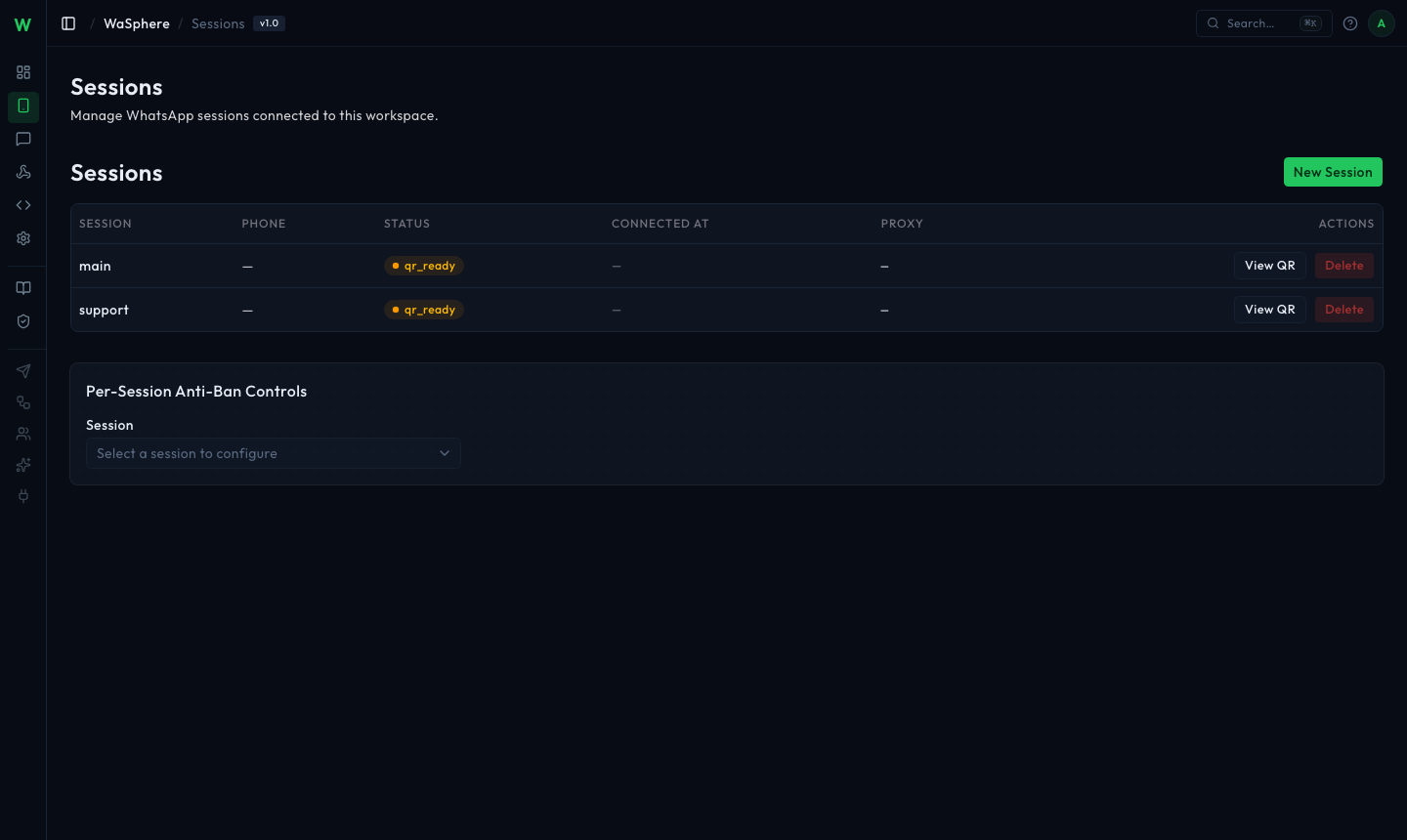
What Makes Up a Session
When you create a session, WaSphere stores:
- Credentials — the Noise protocol keys and registration data Baileys uses to authenticate with WhatsApp's servers. Stored in the
sessions/<session-id>/directory. - Session metadata — the human-readable name, status, anti-ban settings, and webhook associations. Stored in PostgreSQL.
- Send pacing — outgoing messages are paced per session using the configured anti-ban delays and rate limit, applied in-process by the WA Server.
Session Lifecycle
 ┌─────────────────────────────────────────────────────────────────┐
 │                         DISCONNECTED                            │
 │  (initial state — no credentials exist yet)                    │
 └────────────────────────┬────────────────────────────────────────┘
                          │  POST /api/sessions
                          ▼
 ┌─────────────────────────────────────────────────────────────────┐
 │                          CONNECTING                             │
 │  WA Server opens WebSocket to WhatsApp, generates QR code      │
 └────┬───────────────────────────────────────────────────────┬────┘
      │  QR scanned by phone                                  │  Timeout (60s) or
      ▼                                                       │  WhatsApp rejects
 ┌───────────────────────┐                                    │
 │       CONNECTED       │                                    ▼
 │  Session fully active │              ┌─────────────────────────┐
 │  Messages can be sent │              │      DISCONNECTED        │
 └──────────┬────────────┘              │  (QR expired — rescan)  │
            │  Network drop /           └─────────────────────────┘
            │  phone logs out
            ▼
 ┌─────────────────────────────────────────────────────────────────┐
 │                       RECONNECTING                              │
 │  Automatic reconnect with exponential backoff                  │
 │  Up to 5 attempts before moving to DISCONNECTED                │
 └─────────────────────────────────────────────────────────────────┘
Status Values
| Status | Description |
|---|---|
disconnected | No active connection. Either never connected, or explicitly disconnected. Credentials may or may not exist. |
connecting | WA Server is establishing the WebSocket connection and waiting for QR scan. |
connected | Fully authenticated and active. Messages can be sent and received. |
reconnecting | A previously connected session lost its network connection. WA Server is attempting automatic reconnection. |
Creating a Session via API
curl -X POST https://api.yourdomain.com/workspaces/{workspaceId}/proxy/api/sessions \
  -H "Authorization: Bearer wsk_your_key" \
  -H "Content-Type: application/json" \
  -d '{
    "sessionId": "support",
    "description": "Customer support line"
  }'
const workspaceId = 'be11c51b-1a5a-4bc9-9cb6-7ee7040ec4d8';
const response = await fetch(
`https://api.yourdomain.com/workspaces/${workspaceId}/proxy/api/sessions`,
{
method: 'POST',
headers: {
'Authorization': 'Bearer wsk_your_key',
'Content-Type': 'application/json',
},
body: JSON.stringify({
sessionId: 'support',
description: 'Customer support line',
}),
}
);
const session = await response.json();
// { id: 'support', status: 'connecting', qrCode: 'data:image/png;base64,...' }The response includes a qrCode field containing a base64-encoded PNG of the QR code. Display this image to the person scanning.
QR Code Scan Flow
- Your application calls the create-session endpoint — WA Server opens a connection to WhatsApp and generates a QR code.
- The QR code is valid for 60 seconds. If not scanned in time, the session moves to
disconnectedand you must request a fresh QR (see below). - The user opens WhatsApp on their phone → Settings → Linked Devices → Link a Device → scans the QR.
- WhatsApp authenticates the new device and sends back session credentials.
- WA Server stores the credentials in
sessions/<id>/and updates the session status toconnected. - The dashboard emits a
session.connectedwebhook event to all registered endpoints.
Polling for Status
If you're building a custom integration (not using the dashboard UI), poll the session status while displaying the QR:
// Poll every 2 seconds until connected or timeout
async function waitForConnection(workspaceId, sessionId, apiKey, timeoutMs = 90_000) {
  const deadline = Date.now() + timeoutMs;
  const url = `https://api.yourdomain.com/workspaces/${workspaceId}/proxy/api/sessions/${sessionId}`;

  while (Date.now() < deadline) {
    const res = await fetch(url, {
      headers: { 'Authorization': `Bearer ${apiKey}` },
    });
    const session = await res.json();

    if (session.status === 'connected') return session;
    if (session.status === 'disconnected') throw new Error('Session disconnected — QR may have expired, request a fresh one');

    await new Promise(r => setTimeout(r, 2000));
  }

  throw new Error('Connection timed out');
}
Getting a Fresh QR Code
If the original QR expired before scanning:
curl -X POST https://api.yourdomain.com/workspaces/{workspaceId}/proxy/api/sessions/SESSION_ID/qr \
  -H "Authorization: Bearer wsk_your_key"
Response includes a new qrCode and a expiresAt timestamp.
Session Persistence
Session credentials are stored on disk in the sessions/ directory (Docker volume wa-sessions). This means:
- Sessions survive WA Server restarts without needing to re-scan the QR.
- Upgrading WaSphere does not disconnect your sessions (as long as the volume is preserved).
- Moving to a new server requires copying the volume data — see Backup & Restore.
The sessions/ directory contains raw WhatsApp authentication keys. Anyone with access to this directory can impersonate your WhatsApp accounts. Restrict filesystem permissions and never include it in backups stored in untrusted locations without encryption.
Automatic Reconnection
When a connected session loses its network connection (server restart, transient network error, WhatsApp timeout), the WA Server automatically attempts to reconnect using the stored credentials. No QR re-scan is needed.
Reconnection uses exponential backoff:
| Attempt | Delay |
|---|---|
| 1 | 5 seconds |
| 2 | 10 seconds |
| 3 | 20 seconds |
| 4 | 40 seconds |
| 5 | 80 seconds |
After 5 failed attempts, the session status changes to disconnected and a session.disconnected webhook is fired. You can then:
- Trigger a manual reconnect via the dashboard Reconnect button
- Call the reconnect endpoint (
.../proxy/api/sessions/{sessionId}/reconnect) from your application
Multi-Session Setup
Running multiple sessions is a first-class use case in WaSphere. There is no artificial session limit — the practical limit is determined by server RAM and the WhatsApp network's tolerance for concurrent connections from a single IP.
Best practices for multi-session deployments:
Use distinct phone numbers for different purposes — e.g. support, sales, notifications. This allows you to scope API keys to individual sessions so that a compromise of one key doesn't affect others.
# Create three sessions (workspace proxy path, Bearer wsk_ key)
BASE=https://api.yourdomain.com/workspaces/{workspaceId}/proxy/api/sessions
curl -X POST $BASE -d '{"sessionId": "support"}'
curl -X POST $BASE -d '{"sessionId": "sales"}'
curl -X POST $BASE -d '{"sessionId": "notifications"}'
Each session is addressed by the sessionId you chose at creation. When sending a message, the session is selected by the {sessionId} segment in the request URL — not a body field — so requests always route through the correct account.
Anti-Ban Settings per Session
Each session has configurable anti-ban parameters accessible via the dashboard or API:
| Setting | Default | Description |
|---|---|---|
random_delay_min_ms | 4000 | Minimum delay before each outgoing message (milliseconds) |
random_delay_max_ms | 12000 | Maximum delay (actual delay is random between min and max) |
max_messages_per_minute | 0 | Max outgoing messages per rolling 60s (0 = unlimited). Excess is paced, not dropped |
auto_read_on_receive | false | Mark incoming messages as read on arrival |
receive_enabled | true | Emit inbound message events (set false for send-only sessions) |
Update per-session settings:
curl -X PATCH https://api.yourdomain.com/workspaces/{workspaceId}/proxy/api/sessions/SESSION_ID \
  -H "Authorization: Bearer wsk_your_key" \
  -H "Content-Type: application/json" \
  -d '{
    "random_delay_min_ms": 4000,
    "random_delay_max_ms": 12000,
    "max_messages_per_minute": 10
  }'
Higher delays and lower rate limits reduce ban risk on bulk-messaging accounts — but nothing eliminates it. See Anti-Ban Controls for what these settings actually do, and the Meta Cloud API provider if you need the official API instead.
Disconnecting a Session
To gracefully disconnect (preserving credentials for reconnection):
curl -X POST https://api.yourdomain.com/workspaces/{workspaceId}/proxy/api/sessions/SESSION_ID/disconnect \
  -H "Authorization: Bearer wsk_your_key"
To fully delete a session and remove credentials (the phone number will need to be re-linked):
curl -X DELETE https://api.yourdomain.com/workspaces/{workspaceId}/proxy/api/sessions/SESSION_ID \
  -H "Authorization: Bearer wsk_your_key"
Deleting a session is irreversible. The stored credentials are deleted from disk and the phone number is removed from WhatsApp Linked Devices on the next sync. You will need to scan a new QR code to reconnect this number.
Listing Sessions
curl https://api.yourdomain.com/workspaces/{workspaceId}/proxy/api/sessions \
  -H "Authorization: Bearer wsk_your_key"
{
"sessions": [
{
"id": "support",
"name": "support",
"status": "connected",
"phoneNumber": "+447700900123",
"connectedAt": "2026-05-25T08:00:00.000Z",
"lastSeenAt": "2026-05-25T10:30:00.000Z"
},
{
"id": "notifications",
"name": "notifications",
"status": "disconnected",
"phoneNumber": null,
"connectedAt": null,
"lastSeenAt": null
}
],
"total": 2
}Message Templates
Create and send approved Meta message templates from WaSphere — categories, variables, the 24-hour window, and why templates require the Meta Cloud API provider.
Anti-Ban Controls
The real per-session send-pacing controls in WaSphere — the default 4–12s human-like delay, the rolling per-minute cap, read and receive toggles, proxies, and an honest account of what they can and cannot prevent.